
Quote-to-invoice software
Quote-to-invoice software that keeps accepted work connected.
Prepare the quote, send the customer a clear acceptance link and keep the agreed work connected to the invoice Tallyo creates next.
How it works
One connected path from proposal to invoice.
The customer response, original quote and next invoice stay linked, so you can see what was agreed and what happened afterward.
- 1
Prepare the quote
Add the customer, work, prices, dates and any notes the customer should understand before deciding.
- 2
Review before sending
Check the recipient and decide whether the linked invoice should be emailed automatically after acceptance or left for your review.
- 3
Let the customer accept
The customer opens the secure quote page, enters their name and accepts the quote.
- 4
Continue with the linked invoice
Tallyo records who accepted the quote and when, keeps the original quote and creates one linked invoice.
Accepted quote
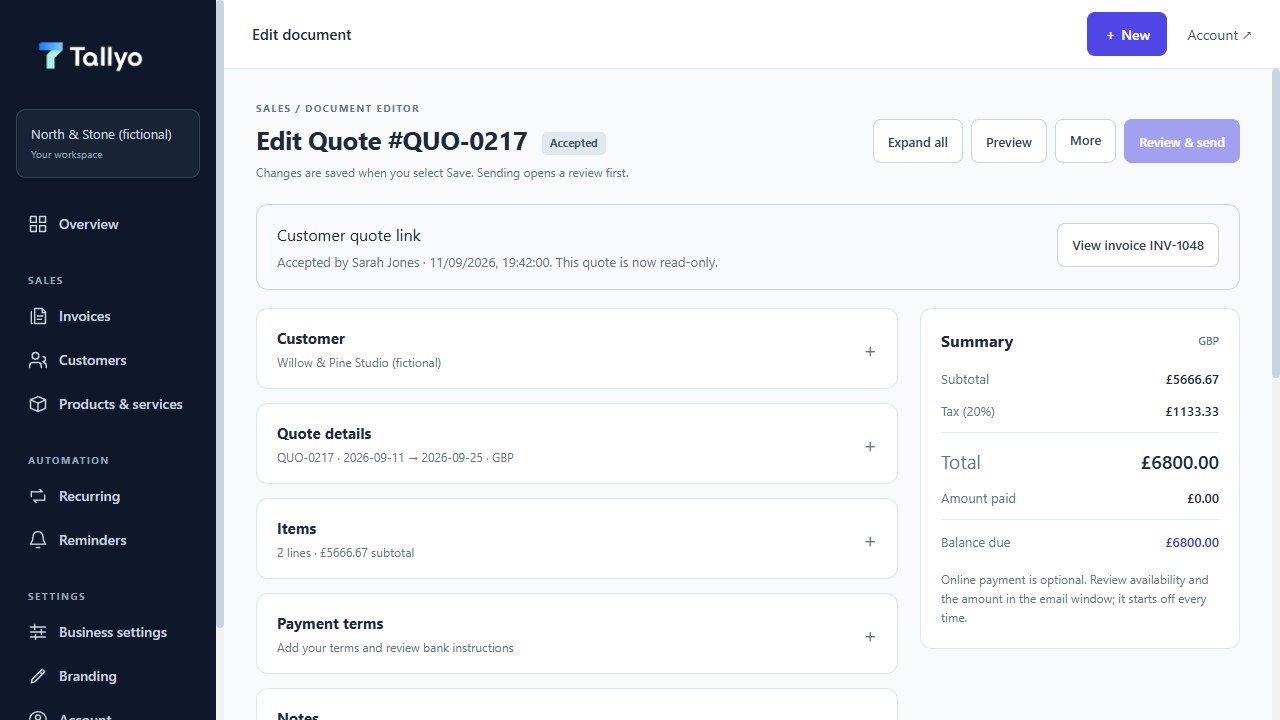
See the accepted quote and linked invoice together
The quote keeps the customer response and the invoice created from it, using fictional demonstration data.
What stays clear
Keep the agreement visible after the invoice exists.
The quote is not replaced or hidden. Tallyo keeps the response with the document, creates one linked invoice and records later sending, reminder and payment updates in the relevant history.
A quote records what you propose and how the customer responded. It does not replace advice about contracts, tax or your legal obligations.
- Original quote retained after acceptance
- Customer name and acceptance time recorded
- One linked invoice created from the accepted quote
- Automatic invoice email only when you choose it before sending
Common questions
Useful answers before you start.
What happens when a customer accepts a quote?
Tallyo records the customer's name and acceptance time, keeps the accepted quote and creates one linked invoice.
Does the original quote remain available?
Yes. The accepted quote remains part of the document history rather than being replaced by the invoice.
Can the new invoice be emailed automatically?
Yes, if you selected automatic invoice email before sending the quote. Otherwise the new invoice stays ready for your review.
Can I make a quote without creating an account?
Yes. The Free Quote Maker lets you prepare and download a quote in your browser. Customer acceptance and linked-invoice creation are Tallyo Pro features.
Ready when you are
Keep the quote and invoice connected.
Create a Tallyo account when you want customer acceptance, linked invoices and later payment updates kept in one workspace.