
Invoice payment tracking
Invoice payment tracking for deposits, part-payments and balances.
Keep each payment with the invoice it belongs to, update the remaining balance and see when the invoice becomes fully paid.
How it works
Update the invoice as money is received.
Record the payment method you agreed with the customer, whether the money arrives all at once or in several stages.
- 1
Open the saved invoice
Use the invoice Payments section so every update stays connected to the correct customer and document.
- 2
Record what arrived
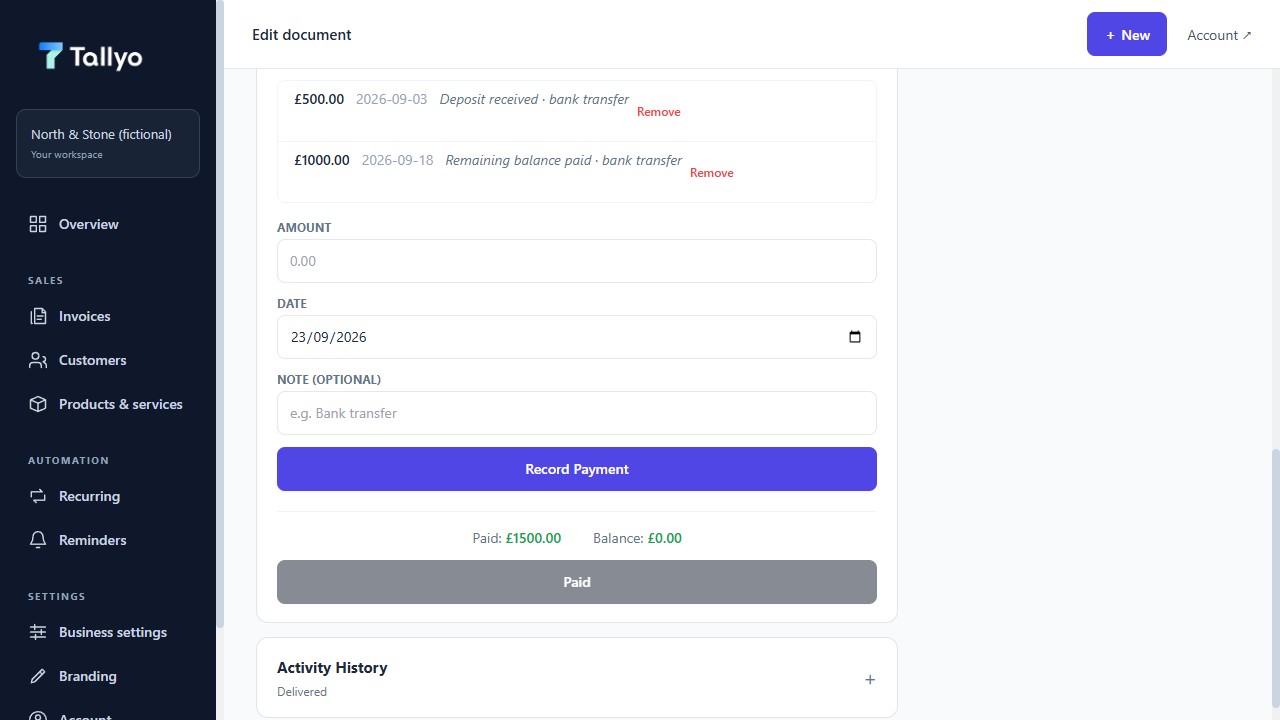
Add the amount, date and method for a deposit, part-payment or final payment.
- 3
Check the remaining balance
Tallyo updates the paid amount and shows what is still left to pay.
- 4
Review the wider picture
Use the activity history and Income Insights to understand payments recorded in Tallyo without mixing currencies.
Payment records
See every recorded amount and the balance left
The invoice payment record shows a fictional deposit, remaining payment and paid balance.
What stays clear
Keep the balance understandable at every stage.
Manual records work for bank transfer, cash or another method you agreed with the customer. Tallyo then uses those records to show paid, outstanding and overdue invoice amounts.
Income views use only invoices and payments recorded in Tallyo. They do not include expenses, unrecorded income, bank balances, tax calculations or HMRC filing.
- Deposits, part-payments and final payments
- Payment date and method kept with the invoice
- Amount paid and amount still due
- Optional customer card payments through your connected Stripe account
Common questions
Useful answers before you start.
Can I record a deposit or part-payment?
Yes. Add each amount to the invoice and Tallyo updates the amount still left to pay.
Can I record a bank transfer or cash payment?
Yes. Add money received by bank transfer, cash or another agreed method to the invoice manually.
Does Tallyo import transactions from my bank?
No. Tallyo does not currently connect to a bank account or import bank transactions automatically.
Can a customer pay an invoice by card?
Yes. Connect your own Stripe account in Account settings. Eligible invoices can then include a secure card-payment link. Stripe handles processing and payouts directly with your business; Stripe fees apply and Tallyo does not add an application fee.
Ready when you are
Keep every payment update with the invoice.
Create a Tallyo account when you want deposits, balances, status and activity kept together instead of updated in separate notes.