
Invoice reminder software
Invoice reminder software that keeps overdue follow-up under your control.
Tallyo shows what is late and still unpaid, but sends reminders only for the invoices where you deliberately turn them on.
How it works
Choose the invoices that need follow-up.
The due date and remaining balance determine what is overdue. Your reminder choice determines what Tallyo follows up.
- 1
Save the invoice details
Include the customer email, due date and the amount the customer needs to pay.
- 2
Turn reminders on for that invoice
Enable overdue reminders only when you want automatic follow-up for this particular document.
- 3
See overdue invoices together
Review the customer, due date, time overdue and amount still to pay from one focused view.
- 4
Check the activity history
See when the invoice and each reminder were sent alongside later payment updates.
Overdue reminders
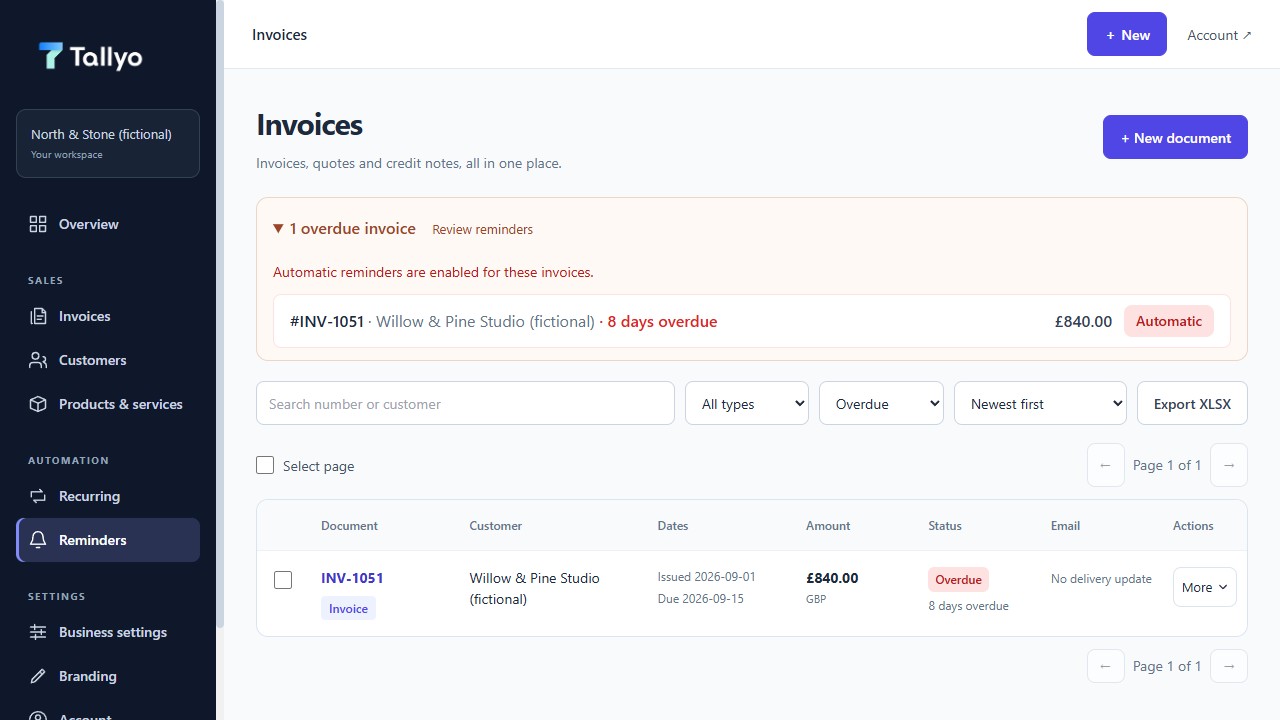
See what is overdue and what will be followed up
The reminders view keeps the invoice, due date, amount and reminder choice visible, using fictional demonstration data.
What stays clear
Keep automatic follow-up deliberate.
An invoice can appear as overdue without receiving a reminder. This lets you keep special arrangements, disputed work or customers you want to contact personally out of the automatic flow.
Tallyo does not send a reminder merely because an invoice has passed its due date. You choose the invoices that use reminders.
- Overdue customer, date and balance shown together
- Reminder choice made per invoice
- Automatic follow-up only after you enable it
- Sent reminders visible in activity history
Common questions
Useful answers before you start.
When does Tallyo treat an invoice as overdue?
An invoice is overdue when its due date has passed and there is still money left to pay.
Are reminders sent for every overdue invoice?
No. Reminders are sent only for invoices where you turned the reminder option on.
Can I see whether a reminder was sent?
Yes. The invoice activity history shows when the invoice and each reminder were sent.
What information is needed before reminders can work?
The saved invoice needs a customer email, due date and an amount still to pay.
Ready when you are
Make overdue follow-up easier to manage.
Create a Tallyo account to keep due dates, reminder choices, sent emails and later payments with the invoice they belong to.